One 4-in-1 60W PD USB-C Cable for Every Device
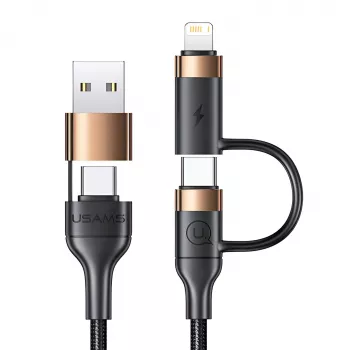
4-in-1 60W PD USB C Cable for Fast Charging and Fewer Cords
A single cable that keeps up with modern devices makes daily charging simpler—at the desk, in the car, and while traveling. Our 4-in-1 60W PD USB C Cable is built for fast USB Power Delivery charging and multi-device convenience, helping you reduce clutter without slowing down your routine. Instead of juggling a separate cord for every device generation, you can keep one dependable option within reach and spend less time hunting for the “right” connector.
What “60W PD” means for everyday charging
USB Power Delivery (USB PD) is a charging standard that lets a charger and your device “talk” to each other and agree on an appropriate power level. When your phone, tablet, or laptop supports PD, that negotiation can enable faster charging than basic 5V-only charging—while still staying within safe limits for the device.
A cable rated for 60W PD is designed to handle higher power levels for USB-C devices that can take advantage of it. That matters most when you’re charging power-hungry gear like tablets, portable monitors, and some lightweight laptops over USB-C. It can also help newer phones charge at their best-supported PD speeds when paired with the right wall adapter or power bank.
Keep in mind that charging speed depends on the full chain: the device has to support a fast-charge method, the charger must provide it, and the cable must be capable of carrying it. If you want the best outcome, match your charger’s wattage to your device’s recommended input and use a quality USB PD wall adapter or PD power bank.
Why a 4-in-1 cable can replace multiple chargers
Most households and work setups are a mix of “new” and “not quite new yet.” A multi-connector design helps cover different device types without packing separate cables for each one. That means fewer cords in your backpack, fewer mystery cables on your desk, and less friction when you swap between devices throughout the day.
A 4-in-1 cable is especially handy when:
- You’re charging both USB-C devices and older accessories in the same space.
- You want a travel kit that stays light and predictable.
- You’re sharing a charging spot with family, roommates, or coworkers.
- You’re trying to clean up cable routing around a power strip or charging hub.
At-a-glance guide: choosing the right cable setup
If you’re building a “one-cable” routine, start with your most power-hungry device and work backward. A phone is easy to satisfy; a tablet or laptop is what reveals whether your setup is truly ready for daily use. If multiple people charge different devices in the same space, a multi-connector cable reduces the constant swapping and connector mismatch.
For travel, prioritize fast charging plus a compact PD wall charger or PD power bank. And if data transfer matters (backups, video files, wired CarPlay/Android Auto, etc.), keep a dedicated high-speed data cable available—many convenience-focused multi-connector cables are optimized primarily for power.
| Use case | Recommended pairing | Why it works |
|---|---|---|
| Desk charging for phone + earbuds | USB PD wall charger + 4-in-1 cable | One charger point covers everyday devices with fewer cords |
| Tablet or USB-C accessory charging | 30W–60W USB PD charger + 4-in-1 cable | Supports faster top-ups on compatible USB-C devices |
| Light travel kit | Compact PD charger or PD power bank + 4-in-1 cable | One cable handles most charging needs in a single pouch |
| Shared household charging spot | Multi-port PD charger + 4-in-1 cable | Reduces connector mismatch when devices vary by port type |
Best ways to use a 4-in-1 PD USB C cable at home, work, and travel
Our team sees the biggest difference when you treat your cable like part of a system, not a loose accessory. A few practical routines make it feel effortless:
- Create a “drop zone” charging spot: Keep the cable plugged into a PD charger where you naturally set your phone down (entry table, desk corner, nightstand). You’ll charge more often without thinking about it.
- Use one cable for mixed-device days: Move between laptop bag, car, and bedside without re-packing multiple cords.
- Pack a compact adapter: A PD wall charger with the right wattage is what unlocks fast charging on supported devices.
- Keep a spare where cables disappear: A second cable in a backpack or drawer prevents last-minute scrambles.
Compatibility notes that prevent frustration
Care tips to keep charging reliable
For general guidance on USB standards and PD concepts, you can reference the USB Implementers Forum (USB-IF) and its USB Power Delivery overview. For broader battery safety practices, NIST publishes research and guidance that’s helpful when you’re thinking about everyday charging habits.
In-stock picks from our store
- 4-in-1 60W PD USB C Cable
- Waterproof Anti-Theft Laptop Backpack with USB Charging Port – Fits 15.6″ Laptop
FAQ
Will a 60W PD USB-C cable fast charge my phone?
It can, as long as your phone supports USB PD fast charging and you pair the cable with a PD-capable charger. The cable may support up to 60W, but your phone controls how much power it actually draws.
Can this cable charge a laptop?
Some laptops can charge over USB-C PD, but the required wattage varies by model. A 60W-capable cable may be enough for some lightweight laptops, while others need higher wattage and a compatible PD charger to match.
Does a 4-in-1 cable transfer data, or is it mainly for charging?
Many multi-connector cables are designed primarily for charging convenience. If you regularly move files or need high-speed data performance, keeping a dedicated data-rated cable on hand is the most reliable approach.
















Leave a comment